 Inboxless
Never open your inbox for a code [again]
Inboxless finds one-time codes in all your Gmail accounts, even the ones signed in to other Chrome profiles, and fills them in for you.
For Google Chrome. Works with Gmail.
How it works
Three steps. Then you forget about codes.
Connect every Gmail
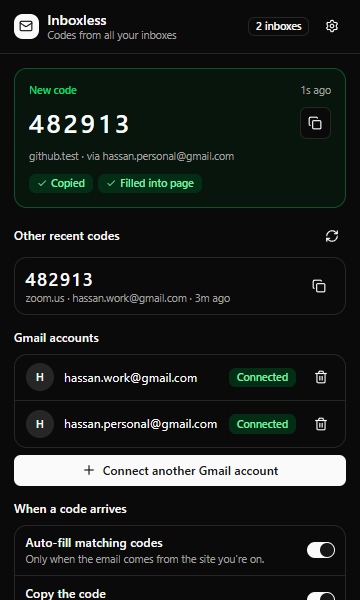
Add all the Gmail accounts you use, including the ones you normally keep in other Chrome profiles.
Log in like always
When a site asks for the code it just emailed you, Inboxless checks all your inboxes at once.
It’s already there
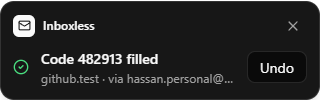
The code is filled into the page and copied to your clipboard, and Inboxless shows you where it came from.
Features
Built for people with more than one inbox.
Every inbox at once
Codes don’t always land where you expect. Inboxless searches all your connected accounts, spam included, in parallel.
Safe by default
A code only fills in automatically when the email comes from the site you’re on. Look-alike phishing pages never get a code without your click.
Works on tricky forms
Single boxes, six separate digit boxes, forms that appear late. For anything unusual, click the field and press Alt+Shift+O.
You’re in control
Pause Inboxless on any site, turn auto-fill off, or delete everything with one click. It can only read mail, never send or change it.
Privacy
Your email never leaves your browser.
- No servers in the middle. Inboxless talks to Gmail directly from your browser. There is no Inboxless server that could store or see your email.
- Only what it needs, only when you need it. Inboxless looks at the last few minutes of mail, only while a code field is open.
- Nothing kept. Codes are held in memory and deleted within minutes. Google access passes expire after an hour and are never written to disk.
- Read-only. Inboxless can’t send, delete or change any email.
FAQ
Questions
Does Inboxless read my email?
Only inside your own browser, and only recent messages while a site is waiting for a code. It looks for a one-time code or a verification link and ignores everything else. Nothing is sent to us.
Why does it need access to Gmail?
To find the code a site just emailed you. Inboxless asks Google for read-only access, which is the narrowest permission that can see an email’s contents.
My accounts are in different Chrome profiles. Does that work?
Yes, that’s what Inboxless is for. Connect all your Gmail accounts once in the profile you work in, and codes are found wherever they land.
What about codes sent by text message, or Outlook?
Inboxless works with Gmail today. Other email providers are on the roadmap.
How do I remove my data?
Open Inboxless settings and choose “Delete all my data”. That disconnects every account, withdraws Google access and erases everything the extension stored.
Stop hunting for codes.
Join the betaEarly access
Inboxless is in private beta.
Want in? Email us and we’ll add your Gmail addresses to the beta.
Email support@codecatch.site